
New MY CARE features coming on Wednesday 11 November
Published: 3 November 2026
MY CARE users will notice new features coming to the service on Wednesday 11 November.
The system upgrade also brings in a new function that enables patients who don’t use the MY CARE app to receive their after visit summaries by email.
Care journeys
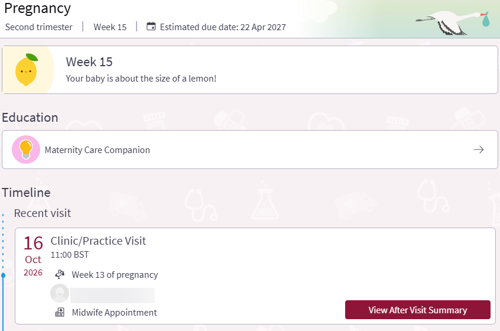
If you are under the care of our Maternity, Oncology or Research teams then you will see the key information for your current care pulled together on one screen in MY CARE called a Care Journey. This includes appointments, medication, test results, tasks and consents.
Updates to After Visit Summaries
MY CARE will now display After Visit Summaries (AVS) showing the latest information recorded for the appointment or admission. If clinicians and support staff have saved an earlier version of the AVS, you can download this version using the link at the bottom of the AVS page.
For patients without MY CARE accounts, staff can now choose to email an AVS via a secure email link. You will need to enter your date of birth to gain temporary access to view the AVS.
A record of your community home visits
The past visits section will now include any home visits you’ve had from our community teams.
This change includes all your previous home visits, so you may see significantly more past appointments in your past visits section than you did before.
Find test results faster
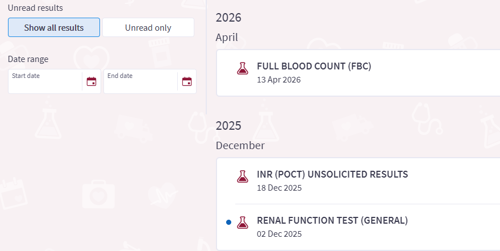
You can now filter test results by unread status and date range, in addition to existing filters like hospital visits. You can also manage your notification preferences for test results directly in the Test Results activity from a new settings page.
Updates to clinical questionnaires
We’ve made some updates to make questionnaires easier to complete on all devices. Where possible we now only show one question per page, with the questions automatically advancing after each answer. When you have completed a questionnaire, a message will appear asking you to confirm that you are ready to submit it. This replaces the Review Answers page.
Emergency contacts
When adding or editing Patient Contacts, you can now designate contacts as emergency contacts. If you have more than one emergency contact, you can also choose which one is the primary contact. Your primary emergency contact is listed first, followed by other emergency contacts and then other contacts.
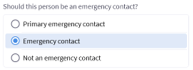
We recommend you take this opportunity to set up an emergency contact – the below banner will display in Patient Contacts if you have no current emergency contact:

Supported devices
MY CARE has updated and the MyChart app is no longer supported on the following devices:
- iPhone 7
- iPhone 7 Plus
- iPhone SE (gen 1)
- iPad mini 4
- iPod touch (gen 7)
For more information and support, please see our MY CARE page.